Bloom Atlas
View Live > https://bloomatlas.larabekmez.workers.dev/
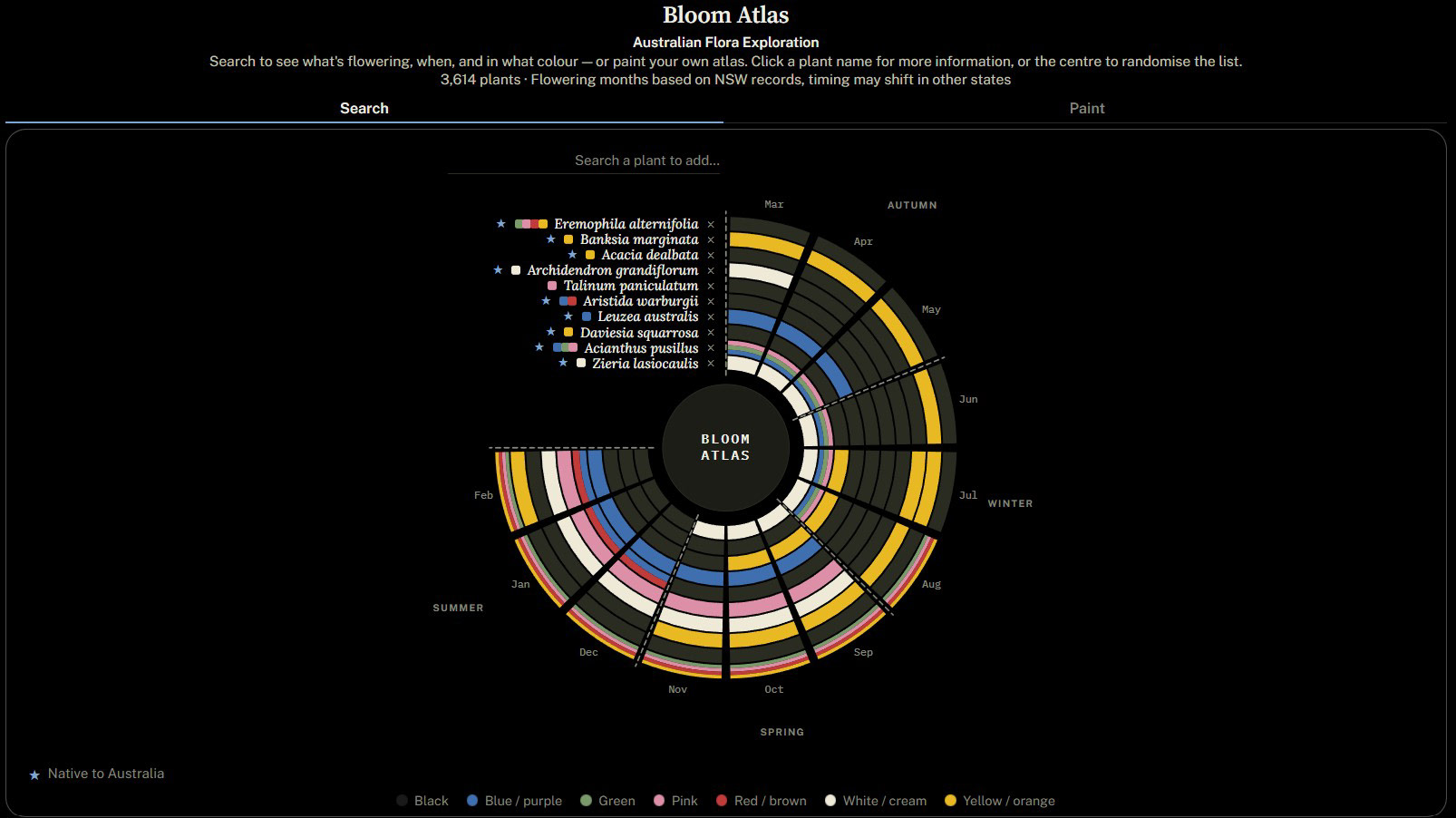
Bloom Atlas - Search function

Bloom Atlas - Paint function
Bloom Atlas is a data analytics and visualisation project that turns plant flowering data into a shared language for designers and clients. It also works as a learning tool for anyone curious about plants and their flowering times.
"Creativity is the ability to introduce order into the randomness of nature."
In this page you will find:
1. Version 1.0: Concept
2. Version 2.0: Bloom Atlas
2.1. Data Analysis
3. Deployment and AI use
4. Final Thoughts
In this page you will find:
1. Version 1.0: Concept
2. Version 2.0: Bloom Atlas
2.1. Data Analysis
3. Deployment and AI use
4. Final Thoughts
TLDR:
Source: AusTraits v7.0.0* is a CC-BY licensed open-access database. Data were modelled and filtered in Power BI to show flower colour, flowering time, Latin name, establishment, taxon distribution, genus and family. Flower colour and flowering time are the two core traits, each was structured into one row per species and the tables were later merged.
Data analysis:
Grain: One row per species, using the binomial (Latin) name. A species-level name is what the shared-language and learning purpose needs for easy communication. Common names are not included in AusTraits v7.0.0.
Flowering months: One source dataset only (AusTraits v7.0.0: PlantNET, NSW), because flowering months can change based on location and the app doesn't include location selection.
Flower colour: Compiled from all sources into one row per plant in the model to show colour as a species trait.
AI: Claude code drafted the Python that converts the modelled table (exported as Parquet) into app's JSON. Also used for frontend creation and updating the final look. Reviewed, questioned and hand-corrected by human.
Deployed to Cloudflare Workers from the github repo.
Result: 3,614 plants (1,027 genera · 153 families) feeding a radial wheel that visualises flowering months and flower colours - up to 10 plants at once. Each wedge is a month, and each plant's flower colours stack within the months it flowers, showing which colours are present.
How to use: Search by Latin name, or paint the wheel to explore. Click the centre of the wheel to randomise the plants shown. Click a plant name to open the plant card that shows the plant's genus, family, establishment and taxon distribution along with its flowering months and flower colours.
Disclaimer: Bloom Atlas is a personal project, not affiliated with or endorsed by AusTraits or its contributing institutions. Provided as is, for general interest: Not horticultural, ecological or agricultural advice.
* Brief Overview of AusTraits database (dated in this project: 12/09/2026):
"AusTraits is a transformative database, containing measurements on the traits of Australia's plant taxa, standardised from hundreds of disconnected primary sources. So far, data have been assembled from > 300 distinct sources, describing > 500 plant traits and > 34,000 taxa."
"AusTraits is a transformative database, containing measurements on the traits of Australia's plant taxa, standardised from hundreds of disconnected primary sources. So far, data have been assembled from > 300 distinct sources, describing > 500 plant traits and > 34,000 taxa."
Falster, D. et al. (2025) “AusTraits: a curated plant trait database for the Australian flora”, Scientific Data. Zenodo. Available at: https://doi.org/10.5281/zenodo.15718081.

Figure 1. Product roadmap: strategy to objectives.
1. Version 1.0: Concept
Version 1.0 explored the UX and UI solutions to carry into the next steps. Visual exploration was the foundation of this step, along with having 'Search' and 'Paint' sections to allow pattern recognition and creation. I decided to build on four objectives: flower colours, flowering time, foliage colours and mature plant sizes. AI used heavily at this step to produce a frontend that carries the vision
(Figures 2-5).
Version 1.0 explored the UX and UI solutions to carry into the next steps. Visual exploration was the foundation of this step, along with having 'Search' and 'Paint' sections to allow pattern recognition and creation. I decided to build on four objectives: flower colours, flowering time, foliage colours and mature plant sizes. AI used heavily at this step to produce a frontend that carries the vision
(Figures 2-5).

Figure 2
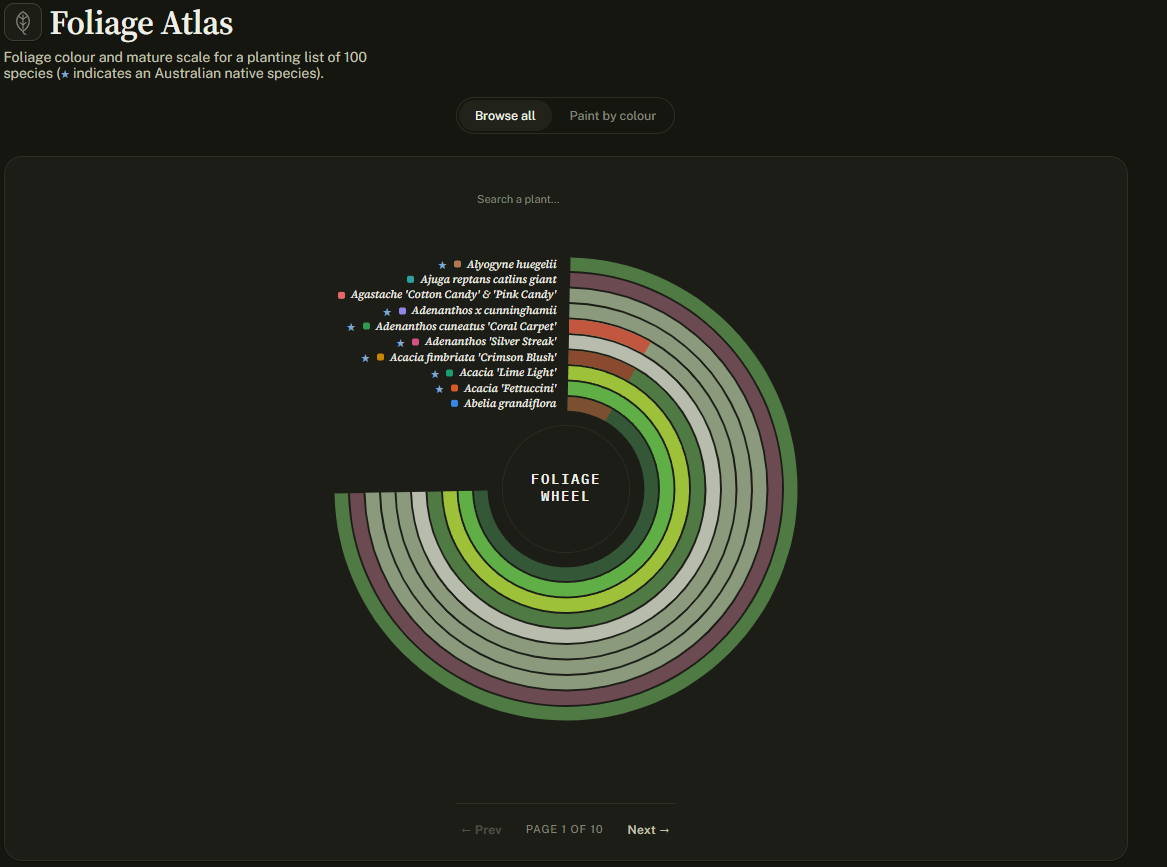
Figure 3

Figure 4

Figure 5
2. Version 2.0: Bloom Atlas
V2.0 is where the visual exploration gained its meaning, with real data included. It was the most challenging step, due to the high-stakes decisions involved in the data analysis process.
For example, I found that visualising only flower colours and flowering times was reasonable given both the structure of the data available and the scope of this project. Foliage colour and mature plant size were therefore descoped from V1.0, and can follow a different structural approach in future work.
V2.0 is where the visual exploration gained its meaning, with real data included. It was the most challenging step, due to the high-stakes decisions involved in the data analysis process.
For example, I found that visualising only flower colours and flowering times was reasonable given both the structure of the data available and the scope of this project. Foliage colour and mature plant size were therefore descoped from V1.0, and can follow a different structural approach in future work.
2.1. Data Analysis
Above mentioned AusTraits database (accessed Sep 2026) was used for data analysis and modelling in this project. Bloom Atlas is a personal project, not affiliated with or endorsed by AusTraits or its contributing institutions.
Import and structure
AusTraits data (austraits-X.X.X-flattened.parquet) was imported into Power BI and referenced to create a new query, 'bloomatlas'.
Using Power Query, I selected only the columns I wanted to analyse further (Figure 6).
Manage columns > Choose columns:
= Table.SelectColumns(Source,{"dataset_id", "trait_name", "source_primary_citation",
"source_secondary_citation", "genus", "family", "binomial", "taxon_distribution",
"establishment_means", "taxon_name", "value"})
Manage columns > Choose columns:
= Table.SelectColumns(Source,{"dataset_id", "trait_name", "source_primary_citation",
"source_secondary_citation", "genus", "family", "binomial", "taxon_distribution",
"establishment_means", "taxon_name", "value"})

Figure 6. (Sourced: https://traitecoevo.github.io/traits.build-book/content/database_structure.html)
Selecting the traits
The trait_name column lists all traits in long format (one row per trait record), so each plant appears on many rows: Including bark, leaf, fruit and seed any much more information. This column filtered to keep only the flowering_time and flower_colour traits (Figure 7).
Setting the grain
I needed a species-level name for visual readability and easy communication. In this dataset, the binomial column holds the species-level name: binomial nomenclature (genus + species), i.e. the Latin name. As a result, taxon_name was removed, binomial was renamed to latin_name, and empty values were removed from this column. At this stage I also removed empty values from the taxon_distribution, establishment_means and value columns, and renamed establishment_means to establishment (Figure 8).

Figure 7

Figure 8
In the bloomatlas table, one plant can have several flower colours and several flowering months. These two attributes differ in nature: flower colour is a species trait, while flowering months tied to where the observation was made and climate plays a large part in that.
Therefore I decided that
> Bloom Atlas (final version) should read as a national colour inventory paired with NSW-observed timing, rather than as a region-matched pairing of the two. Because of this, two trait tables were made: bloom_time and bloom_colour. Each was reduced to one row per plant and later merged. The process is described below.
> Bloom Atlas (final version) should read as a national colour inventory paired with NSW-observed timing, rather than as a region-matched pairing of the two. Because of this, two trait tables were made: bloom_time and bloom_colour. Each was reduced to one row per plant and later merged. The process is described below.
Trait Tables
bloom_time
References the bloomatlas query.
References the bloomatlas query.
Steps:
1. trait_name column filtered to flowering_time, then the column removed.
1. trait_name column filtered to flowering_time, then the column removed.
2. Value column renamed to flowering_time. This column holds flowering time as a sequence of 12 Ns and Ys for the 12 months, starting from January. Records were filtered to keep only those with at least one 'y'. Python was later used to create a JSON file in which each flowering_time string is expressed as the corresponding month names (Figure 9-9.1).
3. source_primary_citation was filtered to list only the sources including "NSW". NHNSW_2014_2 was selected, as it is recent comparing to others and holds the highest distinct count of values to work with (Figure 10-11).

Figure 9

Figure 9.1
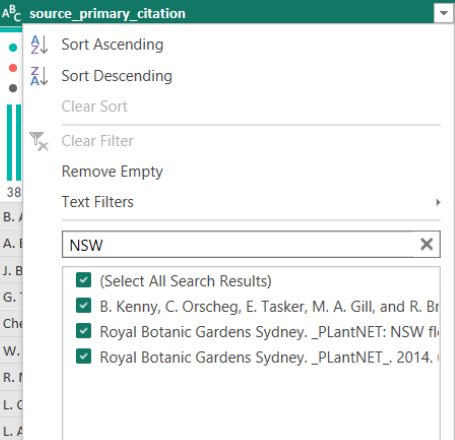
Figure 10
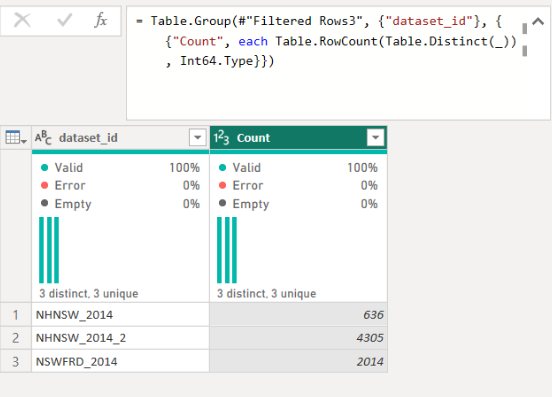
Figure 11
4. 34 plants appeared twice under the same latin_name (binomial) with different flowering times. Both records were removed (68 rows) from bloom_time for data quality and documented separately. These plants are listed in a separate table, with all remaining information pulled from the main AusTraits query for further investigation. I found subspecies and varieties were recorded as separate entries under one binomial (Figure 12).
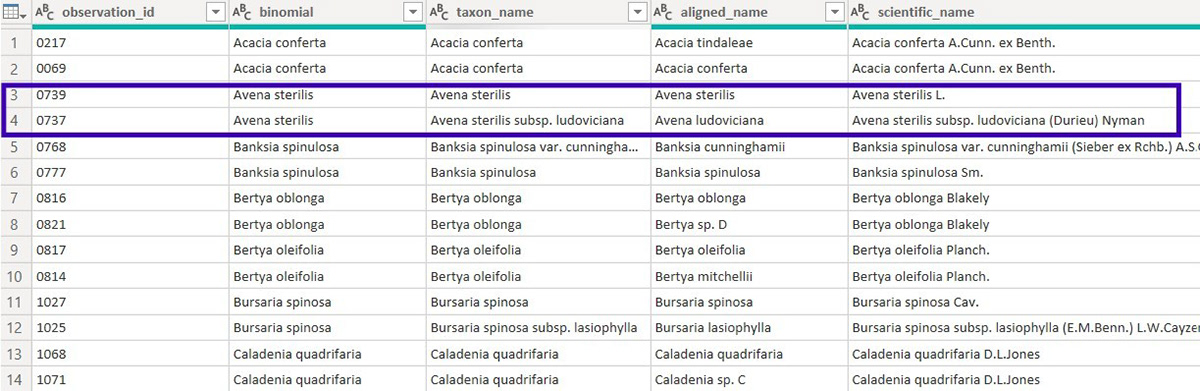
Figure 12: Duplicate records table
bloom_colours
References the bloomatlas query.
References the bloomatlas query.
Steps:
1. trait_name filtered to flower_colour, then this column removed.
2. value column renamed to flower_colour and filtered to remove empty rows.
> Built a separate table from the methods table included with the AusTraits download, to keep contributing sources stay documented for flower colour and flowering time. (Figure 13).

Figure 13. Source table shows the contributing datasets and their methods.
3. Only the latin_name and flower_colour columns were kept; the rest were removed. The flower_colour column was then split by delimiter (Advanced options > Split into rows), giving each colour its own row (Figure 14), and duplicates were removed (Figure 15).
4. Grouped by latin_name using 'All Rows' operation, and set to nest each plant's rows into a table column named 'Data'. That nested column is what the custom column then reads from.
= Table.Group(#"Trimmed Text", {"latin_name"}, {{"Data", each _, type table
[latin_name=text, flower_colour=text]}})
5. A custom column (flower_colours) was created to compile every colour recorded for a plant into one cell. It takes that plant's nested rows, keeps the distinct colours and joins them into a single space-separated text value (Figure 16).
= Table.AddColumn(#"Grouped Rows", "flower_colours",
each Text.Combine(List.Sort(List.Distinct([Data][flower_colour])), " "))
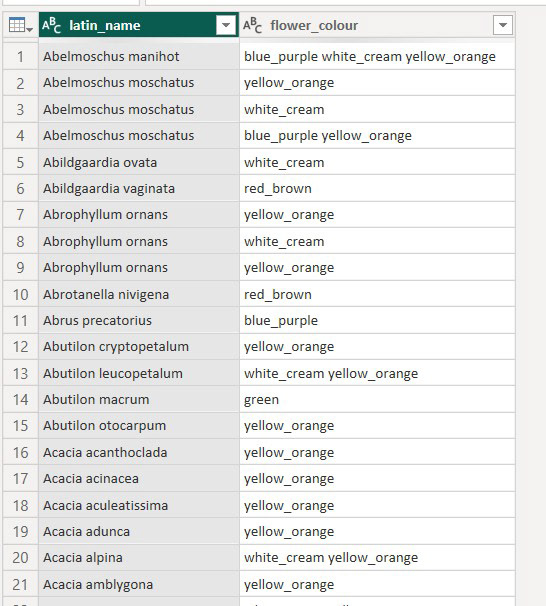
Figure 14

Figure 15
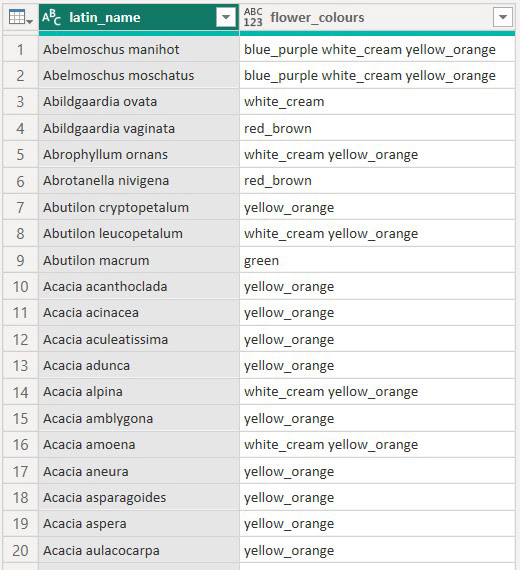
Figure 16
Final dataset: bloom_merged
bloom_time and bloom_colour were merged on latin_name using a left outer join. 3,614 of 4,237 bloom_time rows matched a flower colour record. As a result, bloom_merged has 3,614 species across 1,027 genera and 153 families. Next step is exporting this dataset.
bloom_time and bloom_colour were merged on latin_name using a left outer join. 3,614 of 4,237 bloom_time rows matched a flower colour record. As a result, bloom_merged has 3,614 species across 1,027 genera and 153 families. Next step is exporting this dataset.

Figure 17. Final table and trait tables
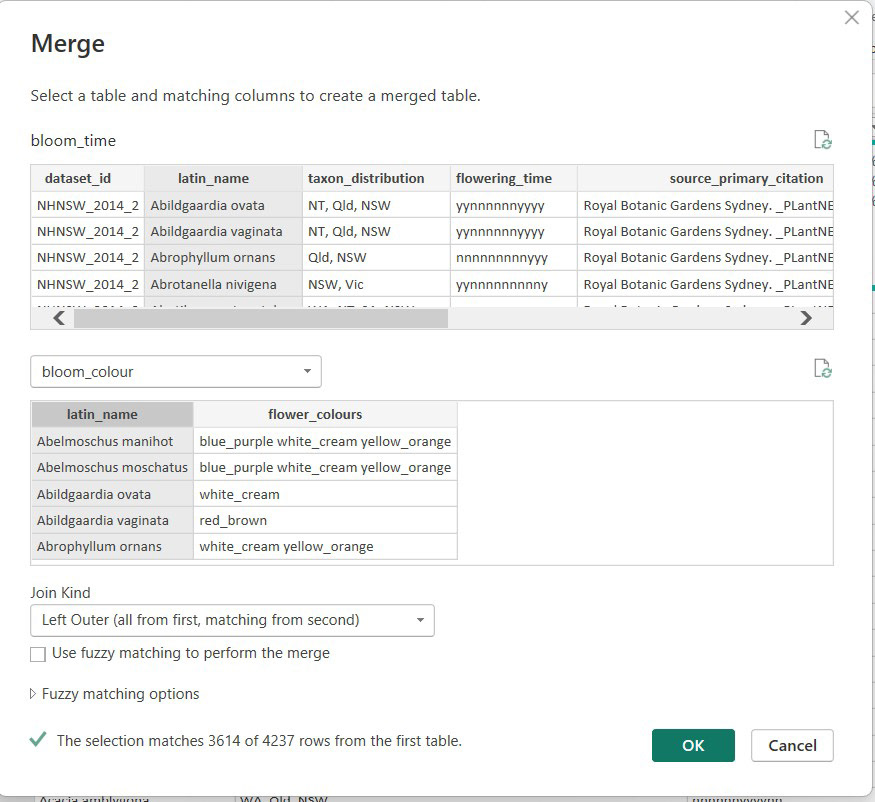
Figure 18. Merge process

Figure 19. Final dataset
3. Deployment and AI use
Final table (bloom_merged) exported as a Parquet file using DAX Studio. AI (Claude Code) utilised to generate a Python file that translates this data into the JSON format so that it can be used by the Bloom Atlas web application. At this stage I also used AI to update the HTML created in Version 1.0.
Final table (bloom_merged) exported as a Parquet file using DAX Studio. AI (Claude Code) utilised to generate a Python file that translates this data into the JSON format so that it can be used by the Bloom Atlas web application. At this stage I also used AI to update the HTML created in Version 1.0.
All three AI-generated files were reviewed by me, and either hand-corrected or raised as a new question so that we understood each other (Figure 20-21).
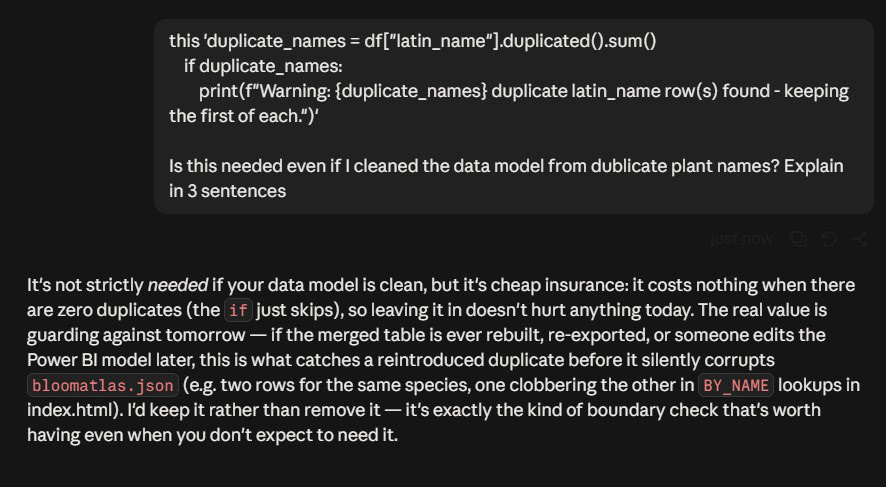
Figure 20. Evaluating AI reasoning in 3 sentence (python)

Figure 21. Change request (HTML)
4. Final Thoughts
I believe creative delivery methods should not only optimise the tools used in the process (e.g. AI plugins in Revit) but also improve complex, client-facing decision-making. In this project, I was comfortable with Power BI for data analysis and careful about borrowing AI fluency to bridge the gap in my coding and evaluation skills. Interests and knowledge can come together in any field to create something that becomes a learning tool for others. In this regard I found data visualisation very powerful, and LLMs can constructively extend an analyst's skills.
I believe creative delivery methods should not only optimise the tools used in the process (e.g. AI plugins in Revit) but also improve complex, client-facing decision-making. In this project, I was comfortable with Power BI for data analysis and careful about borrowing AI fluency to bridge the gap in my coding and evaluation skills. Interests and knowledge can come together in any field to create something that becomes a learning tool for others. In this regard I found data visualisation very powerful, and LLMs can constructively extend an analyst's skills.
-September 2026-